Simulate the whole automation cell with ROS 2
Learn how you can easily test robot behavior, machine physics, sensors, conveyors and PLC logic all together.
Robotics simulation with ROS 2 is often treated as a self-contained problem: import a URDF file, execute a trajectory and check whether it reaches the target. However, in a real automation cell, the robot is only one part of the larger system.
The robot may need to wait for a conveyor to deliver a part, respond to a photoelectric sensor, operate a gripper, exchange signals with a PLC and coordinate with software running elsewhere in the ROS 2 graph. Testing the robot in isolation does not tell you whether the complete machine will behave as intended.
Starting with V1.2, ProtoTwin’s ROS 2 integration makes this broader, integrated simulation possible. You can create ROS 2 nodes, publishers, subscribers, services and actions directly inside your scripted components, while connecting the surrounding equipment to physical or simulated Programmable Logic Controllers (PLCs). And with ProtoTwin’s low-latency communications and high-performance physics simulation capabilities, you can reliably test complex and fast-moving robots, machines and systems in real-time.
The result is a single virtual environment where robotics and automation systems can be easily simulated and tested together. ROS 2 is integrated directly into ProtoTwin Connect, so no separate “bridge” application is required. ProtoTwin Connect is available for Windows and Linux on x64 and Arm64, and for macOS on Apple silicon.
Going beyond the robot
Topics, services and actions make it straightforward for external ROS 2 nodes to communicate with the simulation. That simulation can include:
- Robots
- Conveyors
- Motors and actuators
- Grippers and end-of-arm tooling
- Photoeyes, distance sensors and LiDAR sensors
- Position, orientation, velocity and accelerometer sensors
- Vision cameras
- Pushbuttons and switches
- Indicator lights
- Parts, pallets, totes and other physical payloads
These elements can all interact through physics and IO signals.
Consider a palletizing cell powered by a vision system:
- A PLC starts the infeed conveyor.
- A photoeye detects an arriving box.
- The PLC stops the conveyor and sets a signal indicating that the box is ready to be picked.
- A ROS 2 application processes the last received camera image, determining the exact location of the box.
- A ROS 2 application sends a trajectory goal to the robot.
- The robot moves to the pickup position, completing the goal.
- A ROS 2 application triggers the vacuum gripper.
- The box is gripped by the robot’s vacuum gripper tool.
- A sensor detects that the box has cleared the pickup position.
- The PLC advances the machine sequence by transfering the next box.
This workflow crosses several engineering boundaries. The conveyor and machine sequence will be the responsibility of a controls engineer, while robot motion and planning will be the responsibility of a robotics engineer. The digital twin provides a single unified simulation environment against which engineers can test each part in isolation and, finally, the whole workcell.
Connecting ROS 2 to ProtoTwin
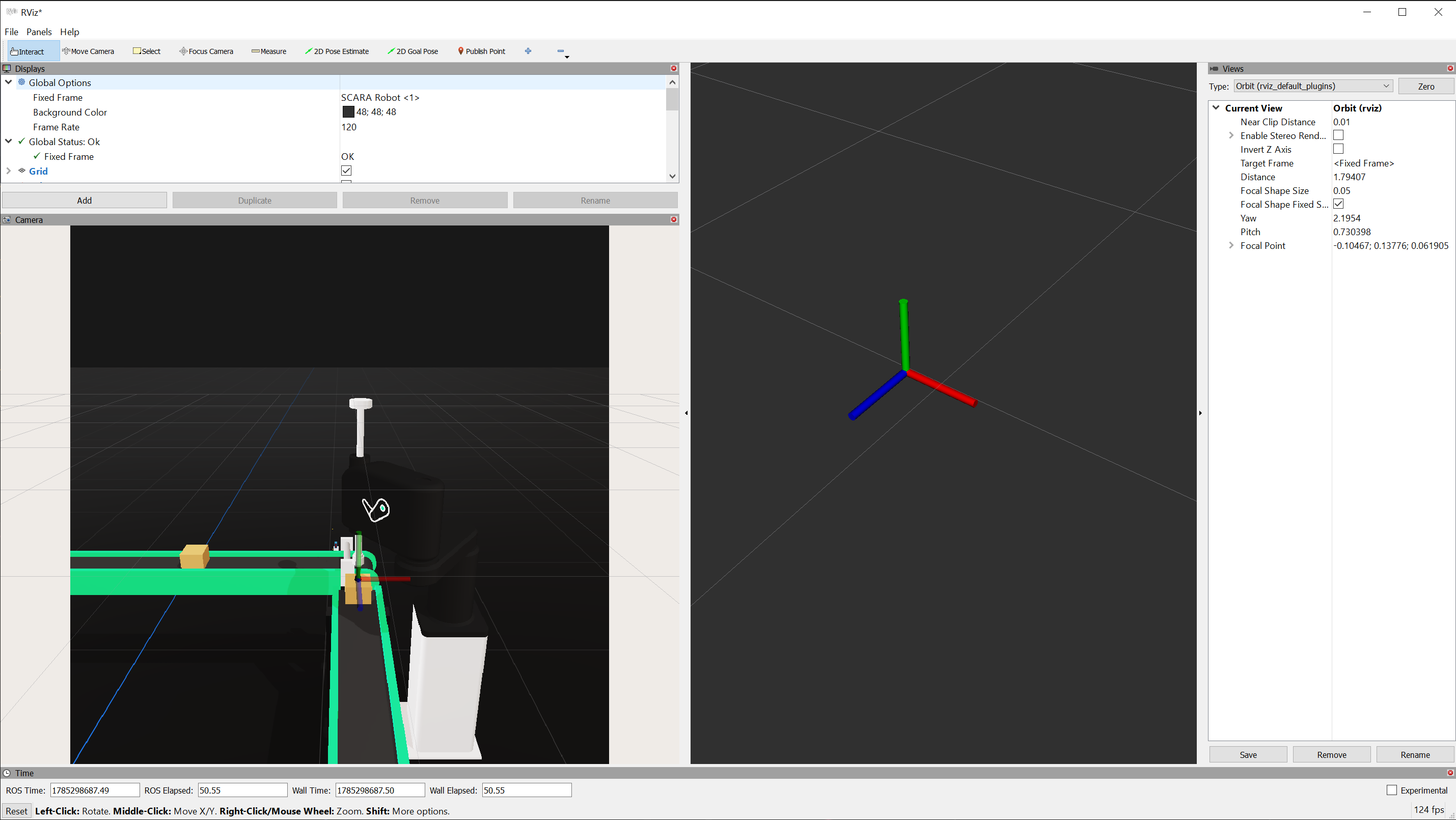
You can create ROS 2 nodes, publishers, subscribers, services and actions inside scripted components. The integrated script editor understands the ROS 2 types in your environment, detects type errors and provides IntelliSense suggestions.
Publishing
Let’s take a look at a concrete real-world example of publishing measurements from a distance sensor.
import { Component, DistanceSensorComponent, ROS2 } from "prototwin";

export class SensorPublishExample extends Component {
    #node = ROS2.createNode("prototwin");
    #publisher = this.#node.createPublisher("/distance_sensor", "std_msgs/msg/Float64");

    public sensor = this.handle(DistanceSensorComponent);

    public override initialize(): void {
        this.subscribe(this.sensor.value!.io.distance, (distance: number) => {
            this.#publisher.publish({ data: distance });
        });
    }
}
Every time the distance measured by the sensor changes, we publish the latest measurement to the /distance_sensor topic. This example uses the std_msgs/msg/Float64 message type, but custom message types work in the same way. ProtoTwin automatically discovers them from your sourced ROS 2 environment.
Subscribing
Subscriptions follow the same pattern. This component subscribes to the /pusher topic and sets the target position of a motor to 250mm whenever the boolean value received is true.
import { Component, MotorComponent, ROS2 } from "prototwin";

export class ActuatorSubscribeExample extends Component {
    #node = ROS2.createNode("prototwin");
    #subscriber = this.#node.createSubscription("/pusher", "std_msgs/msg/Bool");

    public motor = this.handle(MotorComponent);

    public override initialize(): void {
        this.subscribe(this.#subscriber, (message) => {
            this.motor.value!.targetPosition = message.data ? 0.25 : 0;
        });
    }
}
Automatic Type Safety
ProtoTwin automatically provides type safety for its ROS 2 API.
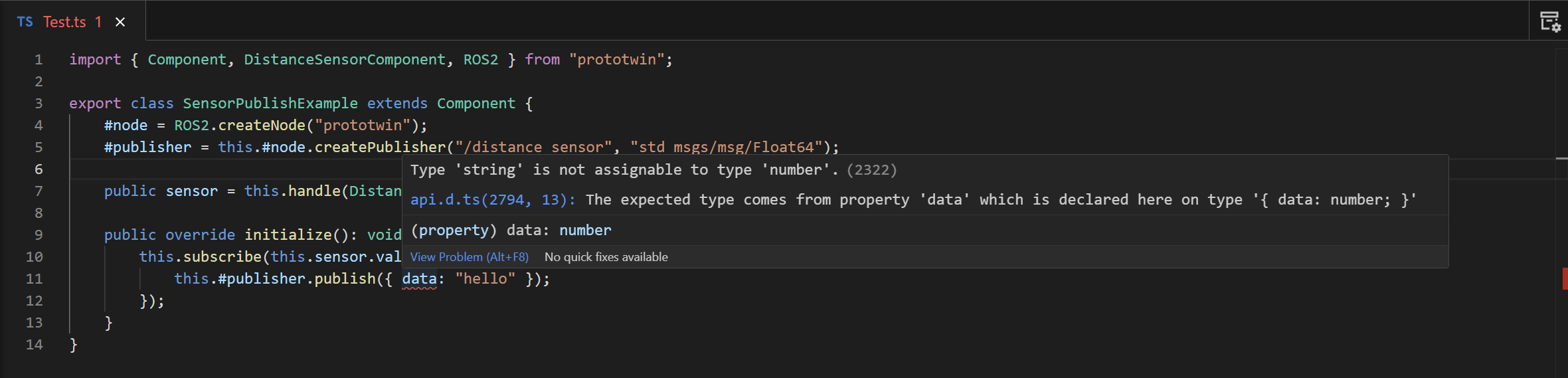
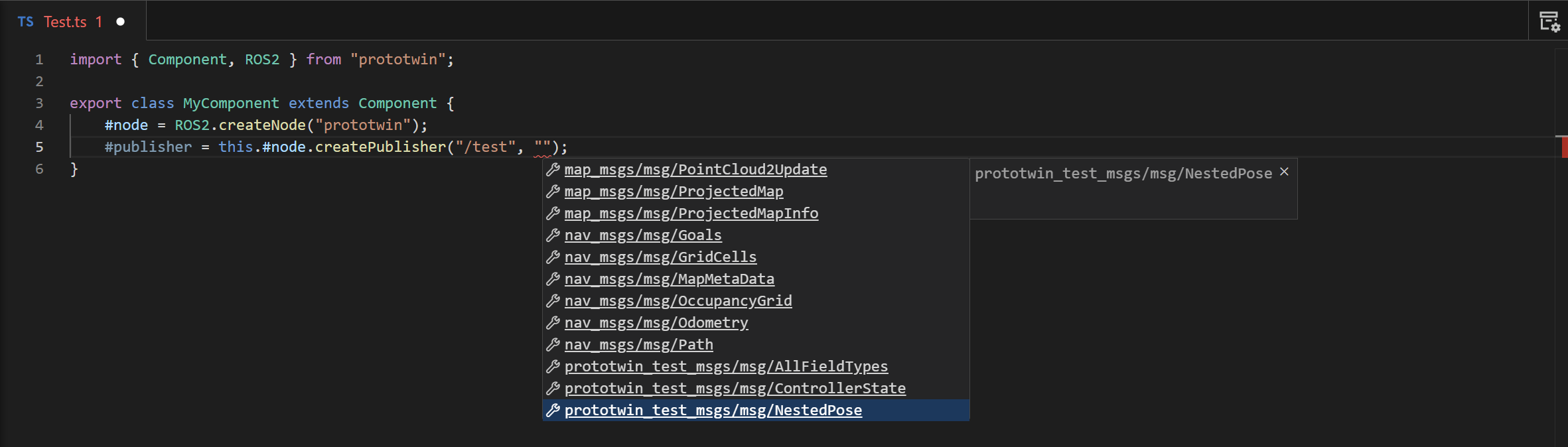
You do not need to define your ROS types separately in ProtoTwin. ProtoTwin Connect discovers the message, service and action types in your sourced ROS 2 environment, generates the corresponding TypeScript definitions and loads them into the scripting environment.
IntelliSense
The generated TypeScript definitions also power code completion in the integrated script editor. After typing:
publisher.publish({IntelliSense can suggest the fields available on the corresponding ROS type, including custom types.
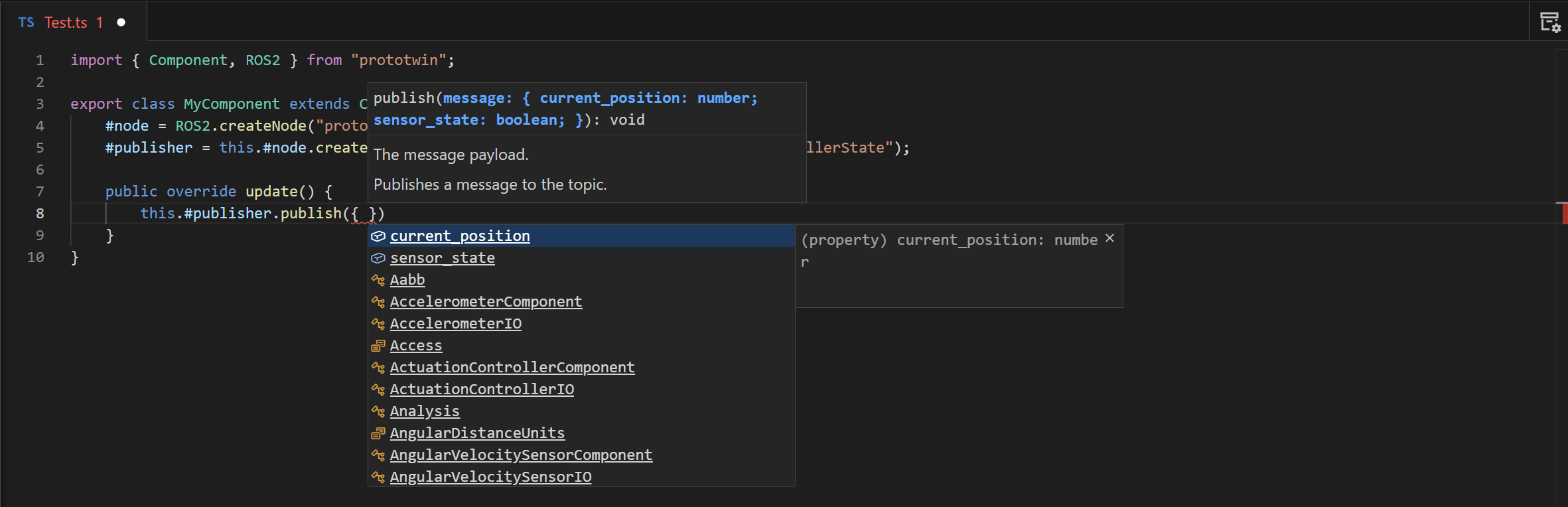
This is particularly useful for types with many properties or nested structures. Although the types originate from the ROS 2 environment, working with them feels like using a strongly typed TypeScript library.
Quality of Service
Quality of Service (QoS) settings can be supplied when creating a publisher or subscriber. For example, a stream of distance sensor values might favor low latency over guaranteed delivery:
#publisher = this.#node.createPublisher("/test", "std_msgs/msg/Float64", {
    reliability: ROS2.QoSReliability.BestEffort,
    history: ROS2.QoSHistory.KeepLast,
    depth: 1
});
The API includes settings for reliability, durability, history, queue depth, deadlines, lifespan and liveliness.
Namespacing
Nodes can also use namespaces and name remapping. This makes it possible to reuse the same scripts in different automation cells or connect them to an existing ROS 2 graph without rewriting every topic name.
const node = ROS2.createNode("robot", { namespace: this.entity.name });Services
Some operations fit the request-and-response model of a ROS 2 service better than a topic. For example, a service can expose control of a simulated indicator light:
node.createServiceServer("/toggle_light", "std_srvs/srv/SetBool", (request) => {
    this.#indicatorLight.value!.state = request.data;
    return {
        success: true,
        message: request.data ? "Light On" : "Light Off"
    };
});
A service client can also be easily created and called:
const client = node.createServiceClient("/release_brake", "std_srvs/srv/Trigger");
client.call({}).then((response) => {
    console.log(response.message);
});
Actions
Actions are useful for long-running operations where the caller needs to know whether a command was accepted, receive progress feedback or cancel the operation. For example, a simulated gripper can be commanded through a standard action interface:
const client = node.createActionClient("/gripper_command", "control_msgs/action/GripperCommand");
const goal = client.sendGoal({
    command: {
        position: 0.04,
        max_effort: 20
    }
});

goal.feedback.subscribe((feedback) => {
    console.log(`Gripper position: ${feedback.position}`);
});

goal.result.then(({ result }) => {
    console.log(`Reached goal: ${result.reached_goal}`);
});
The goal, feedback and result are all type-safe. The integrated scripting environment knows the structure associated with control_msgs/action/GripperCommand and can offer IntelliSense for the relevant fields at each stage.
Wrappers
The @prototwin/ros2-wrappers package provides convenience wrappers for creating common publishers, subscribers, services and actions. Let’s take a look at how we can very quickly create a number of different publishers along with a robot trajectory action server:
import { Component, Entity, ROS2, RobotControllerComponent } from "prototwin";
import { SimulationTimePublisher, JointStatePublisher, PosePublisher, EntityTransformPublisher, EntityTransformFlags, OdometryPublisher, CameraPublisher, FollowJointTrajectoryActionServer } from "@prototwin/ros2-wrappers";

export class WrappersExample extends Component {
    #node = ROS2.createNode("prototwin");
    #timePublisher = new SimulationTimePublisher(this.#node, this.world);
    #jointStatePublisher = new JointStatePublisher(this.#node);
    #posePublisher = new PosePublisher(this.#node);
    #transformPublisher = new EntityTransformPublisher(this.#node, { transforms: EntityTransformFlags.IncludeEntityAndDescendants });
    #odometryPublisher = new OdometryPublisher(this.#node);
    #imagePublisher = new CameraPublisher(this.#node, this.world, { width: 1024, height: 1024 });
    #cameraTransformPublisher = new EntityTransformPublisher(this.#node);
    #followJointTrajectoryActionServer = new FollowJointTrajectoryActionServer(this.#node, "/xarm6");

    public scaraRobot = this.handle(RobotControllerComponent);
    public xarmRobot = this.handle(RobotControllerComponent);
    public camera = this.handle(Entity);

    public override initialize(): void {
        this.#jointStatePublisher.controller = this.scaraRobot.value;
        this.#posePublisher.entity = this.scaraRobot.value!.tcp;
        this.#transformPublisher.entity = this.scaraRobot.value!.entity;
        this.#odometryPublisher.entity = this.scaraRobot.value!.tcp;
        this.#odometryPublisher.base = this.scaraRobot.value!.entity;
        this.#imagePublisher.entity = this.camera.value;
        this.#cameraTransformPublisher.entity = this.camera.value;
        this.#followJointTrajectoryActionServer.controller = this.xarmRobot.value;
    }
}
The FollowJointTrajectoryActionServer wrapper commands the specified robot controller to follow received trajectories and streams feedback to the caller. The CameraPublisher wrapper will automatically create the vision camera and position it using the specified entity’s transform.
Bringing the PLC into the loop
Components in ProtoTwin can expose input and output signals (I/O points). These I/O signals can be bound to PLC tags or variables through the integrated I/O Browser. The low-latency connectivity layer supports many industrial protocols including Siemens S7, Modbus TCP/IP, EtherNet/IP, Beckhoff ADS, Omron FINS, OPC UA and Mitsubishi MELSEC.
The PLC therefore does not need to be replaced by a simplified approximation during testing. A physical or simulated PLC can control the virtual equipment using the same tags and control logic that it will use on the real machine.
Our goal was not to hide ROS 2 behind a reduced interface. It is to remove complex, time-consuming integration work while retaining the ROS 2 concepts robotics engineers already know. By combining native ROS 2 communication, machine physics and PLC connectivity, ProtoTwin allows engineers to simulate and virtually commission the complete automation cell in a single environment.