ROS 2
ProtoTwin Connect supports high-performance ROS 2 communication using the DDS protocol. You can create ROS 2 nodes, publishers, subscribers, services and actions inside scripted components. The integrated script editor understands the ROS 2 types in your environment, detects type errors and provides IntelliSense suggestions.
Enabling ROS 2
Using ROS 2 with ProtoTwin Connect requires sourcing your ROS 2 environment so that ProtoTwin can locate your ROS 2 installation, packages, and message, service, and action types.
On Linux:
source /opt/ros/jazzy/setup.bashOn Windows:
call C:\path\to\ros2\local_setup.batAlternatively, for a custom workspace, source the workspace’s setup script instead.
On Linux:
source install/setup.bashOn Windows:
call install\setup.batAfter sourcing your ROS 2 environment in your terminal, you must start ProtoTwin Connect with the --ros2 flag:
ProtoTwinConnect --ros2Nodes
A ROS 2 node is a modular program that performs a particular function and communicates with other nodes through ROS 2. You can create ROS 2 nodes inside your scripted components:
import { Component, ROS2 } from "prototwin";

export class NodeExample extends Component {
    #node = ROS2.createNode("my_node");
}
Nodes typically work together, communicating through topics, services, or actions.
Topics
A ROS 2 topic is a named channel through which nodes can exchange messages. Nodes publish messages to topics, while other nodes can subscribe to receive those messages on the topics that they’re interested in.
Topics are used when data is sent continuously or whenever it changes, and no direct response is required. Examples include sensor readings, joint states, and continuous camera images.
Publishers
You can publish messages to topics. In this concrete example, the component publishes the latest measurement to the /distance_sensor topic.
import { Component, DistanceSensorComponent, ROS2 } from "prototwin";

export class SensorPublishExample extends Component {
    #node = ROS2.createNode("prototwin");
    #publisher = this.#node.createPublisher("/distance_sensor", "std_msgs/msg/Float64");

    public sensor = this.handle(DistanceSensorComponent);

    public override initialize(): void {
        this.subscribe(this.sensor.value!.io.distance, (distance: number) => {
            this.#publisher.publish({ data: distance });
        });
    }
}
Every time the distance measured by the sensor changes, we publish the latest measurement to the /distance_sensor topic. This example uses the std_msgs/msg/Float64 message type, but custom message types work in the same way. ProtoTwin automatically discovers them from your sourced ROS 2 environment.
Subscribers
Subscriptions follow the same pattern. This component subscribes to the /pusher topic and sets the target position of a motor to 250mm whenever the boolean value received is true.
import { Component, MotorComponent, ROS2 } from "prototwin";

export class ActuatorSubscribeExample extends Component {
    #node = ROS2.createNode("prototwin");
    #subscriber = this.#node.createSubscription("/pusher", "std_msgs/msg/Bool");

    public motor = this.handle(MotorComponent);

    public override initialize(): void {
        this.subscribe(this.#subscriber, (message) => {
            this.motor.value!.targetPosition = message.data ? 0.25 : 0;
        });
    }
}
Services
A ROS 2 service is a named request–response interface. One node sends a request, and another processes it and returns a response.
Services are typically used for discrete operations that require a result, such as retrieving information, changing a setting, or triggering a short task.
Service Clients
Service clients call services and receive a response.
const client = node.createServiceClient("/set_brake", "std_srvs/srv/SetBool");
client.call({ data: true }).then((response) => {
    console.log(response.message);
});
This example calls the /set_brake service, passing a request object consisting of a single boolean to enable a brake.
Service Servers
Service servers respond to requests, issuing a response. For example, a service can provide control over a simulated indicator light:
node.createServiceServer("/toggle_light", "std_srvs/srv/SetBool", (request) => {
    this.#indicatorLight.value!.state = request.data;
    return {
        success: true,
        message: request.data ? "Light On" : "Light Off"
    };
});
Actions
A ROS 2 action is a goal-based interface for operations that may take time to complete. A client sends a goal, receives progress feedback while it runs, and finally receives a result when it finishes.
Actions are typically used for long-running or cancellable tasks, such as navigating to a position or commanding a robot to move along a trajectory.
Action Clients
An action client sends a goal request to a named action and receives feedback along with a result. For example, a simulated gripper can be commanded through a standard action interface:
const client = node.createActionClient("/gripper_command", "control_msgs/action/GripperCommand");
const goal = client.sendGoal({
    command: {
        position: 0.04,
        max_effort: 20
    }
});

goal.feedback.subscribe((feedback) => {
    console.log(`Gripper position: ${feedback.position}`);
});

goal.result.then(({ result }) => {
    console.log(`Reached goal: ${result.reached_goal}`);
});
Action Servers
An action server receives goal requests for a named action, executes accepted goals, provides progress feedback, and returns a result. This example accepts one goal at a time and sends feedback at the end of each timestep:
import { type Entity, type Handle, Component, MotorComponent, ROS2 } from "prototwin";

export class GripperActionServerExample extends Component {
    #node = ROS2.createNode("robot");
    #goal: ROS2.ActionGoalHandle<"control_msgs/action/GripperCommand"> | null = null;

    public motor: Handle<MotorComponent> = this.handle(MotorComponent);

    public constructor(entity: Entity) {
        super(entity);
        this.#node.createActionServer("/gripper_command", "control_msgs/action/GripperCommand", {
            goal: () => this.#goal === null, // Accept the goal if one isn't already in progress
            execute: (goal) => {
                this.#goal = goal;
                this.motor.value!.targetPosition = goal.request.command.position;
            }
        });
    }

    public override postUpdate(): void {
        if (this.#goal === null) { return; }

        const motor = this.motor.value!;
        const reached = Math.abs(motor.targetPosition - motor.currentPosition) < 0.001;
        const state = {
            position: motor.currentPosition,
            effort: Math.abs(motor.currentForce),
            stalled: motor.stalled,
            reached_goal: reached
        };

        this.#goal.sendFeedback(state);

        if (reached || motor.stalled) {
            this.#goal.succeed(state);
            this.#goal = null;
        }
    }
}
Wrappers
The @prototwin/ros2-wrappers package provides convenience wrappers for creating common publishers, subscribers, services, and actions. The following example creates several publishers and a robot trajectory action server:
import { Component, Entity, ROS2, RobotControllerComponent } from "prototwin";
import { SimulationTimePublisher, JointStatePublisher, PosePublisher, EntityTransformPublisher, EntityTransformFlags, OdometryPublisher, CameraPublisher, FollowJointTrajectoryActionServer } from "@prototwin/ros2-wrappers";

export class WrappersExample extends Component {
    #node = ROS2.createNode("prototwin");
    #timePublisher = new SimulationTimePublisher(this.#node, this.world);
    #jointStatePublisher = new JointStatePublisher(this.#node);
    #posePublisher = new PosePublisher(this.#node);
    #transformPublisher = new EntityTransformPublisher(this.#node, { transforms: EntityTransformFlags.IncludeEntityAndDescendants });
    #odometryPublisher = new OdometryPublisher(this.#node);
    #imagePublisher = new CameraPublisher(this.#node, this.world, { width: 1024, height: 1024 });
    #cameraTransformPublisher = new EntityTransformPublisher(this.#node);
    #followJointTrajectoryActionServer = new FollowJointTrajectoryActionServer(this.#node, "/xarm6");

    public scaraRobot = this.handle(RobotControllerComponent);
    public xarmRobot = this.handle(RobotControllerComponent);
    public camera = this.handle(Entity);

    public override initialize(): void {
        this.#jointStatePublisher.controller = this.scaraRobot.value;
        this.#posePublisher.entity = this.scaraRobot.value!.tcp;
        this.#transformPublisher.entity = this.scaraRobot.value!.entity;
        this.#odometryPublisher.entity = this.scaraRobot.value!.tcp;
        this.#odometryPublisher.base = this.scaraRobot.value!.entity;
        this.#imagePublisher.entity = this.camera.value;
        this.#cameraTransformPublisher.entity = this.camera.value;
        this.#followJointTrajectoryActionServer.controller = this.xarmRobot.value;
    }
}
The FollowJointTrajectoryActionServer wrapper commands the specified robot controller to follow received trajectories and streams feedback to the caller. The CameraPublisher wrapper will automatically create the vision camera and position it using the specified entity’s transform.
Quality of Service
Quality of Service (QoS) settings can be supplied when creating a publisher or subscriber. For example, a stream of distance sensor values might favor low latency over reliable delivery:
#publisher = this.#node.createPublisher("/distance_sensor", "std_msgs/msg/Float64", {
    reliability: ROS2.QoSReliability.BestEffort,
    history: ROS2.QoSHistory.KeepLast,
    depth: 1
});
The API includes settings for reliability, durability, history, queue depth, deadlines, lifespan and liveliness.
Namespacing
Nodes can also use namespaces and name remapping. This lets you reuse scripts across different automation cells and connect their nodes to an existing ROS 2 graph without rewriting every topic name.
const node = ROS2.createNode("robot", { namespace: this.entity.name });Automatic Type Safety
ProtoTwin automatically provides type safety for its ROS 2 API.
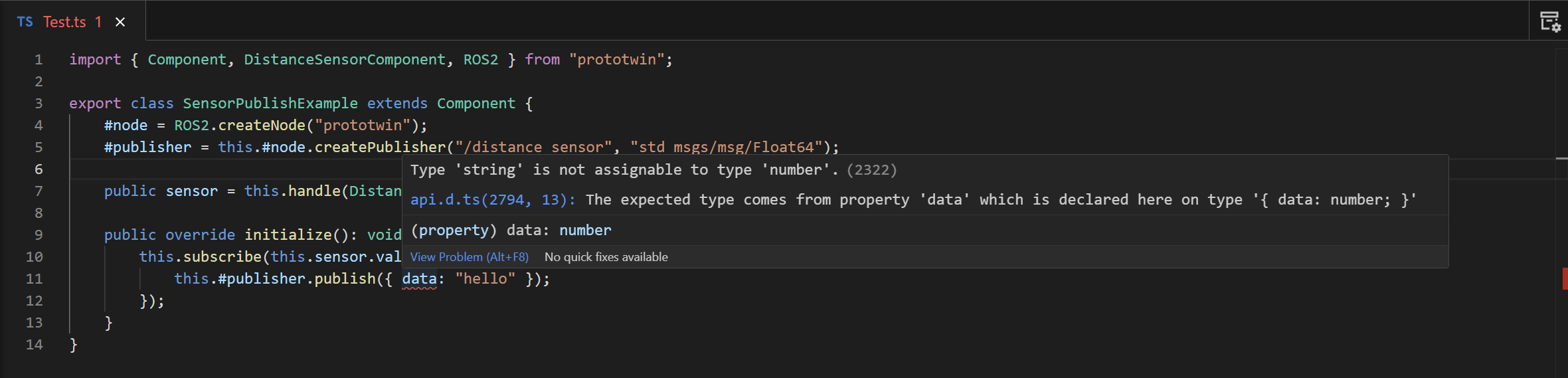
You do not need to define your ROS types separately in ProtoTwin. ProtoTwin Connect discovers the message, service and action types in your sourced ROS 2 environment, generates the corresponding TypeScript definitions and loads them into the scripting environment.
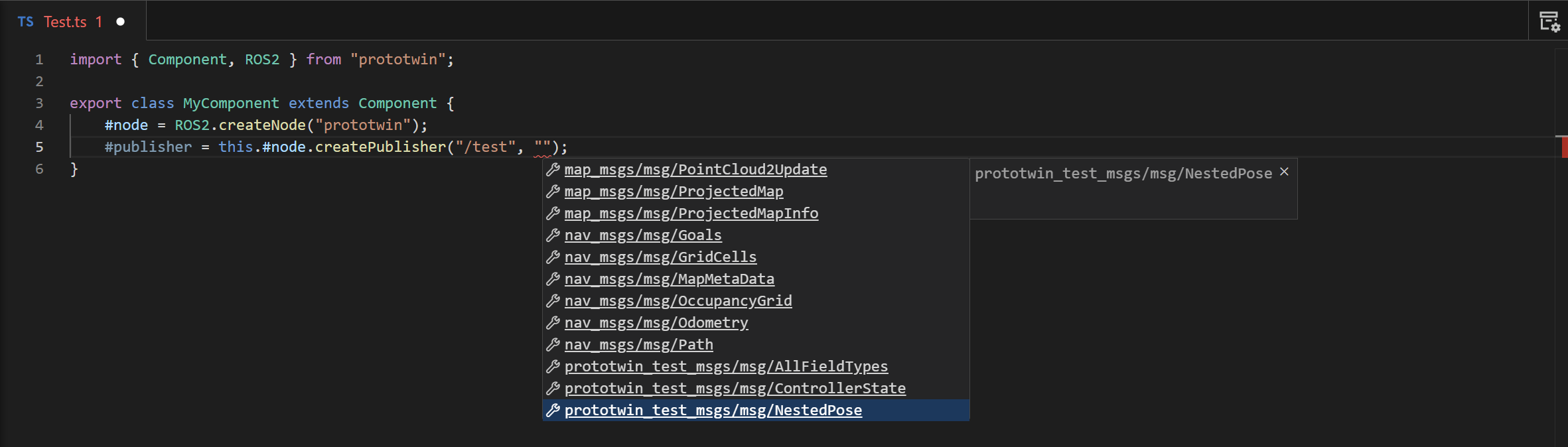
IntelliSense
The generated TypeScript definitions also power code completion in the integrated script editor. After typing:
publisher.publish({IntelliSense can suggest the fields available on the corresponding ROS type, including custom types.
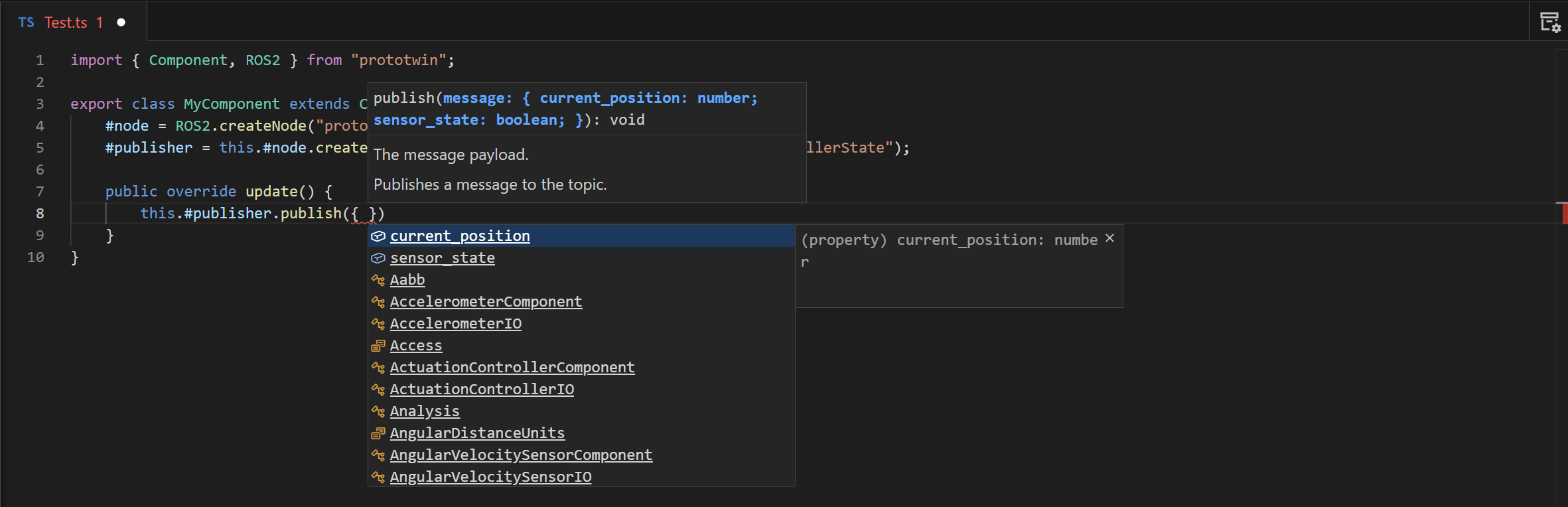
This is particularly useful for types with many properties or nested structures. Although the types originate from the ROS 2 environment, working with them feels like using a strongly typed TypeScript library.