Sequence
The sequence component allows sequences to be created through the inspector UI, as opposed to the script editor. Please see the API documentation for more information about the sequence component.
Operations
The sequence component supports a number of operations that get executed sequentially.
Empty
The empty operation is used as a placeholder. It performs no action when executed.
Pause
The pause operation causes the sequence component to pause execution for a fixed number of seconds.
Await Signal
The await signal operation is used to pause execution of the sequence until the specified signal on the sequence component IO reports a particular value. For example, this operation can be used to pause execution until a sensor is blocked. Note that you must first create an IO signal/variable on the component.
Set Signal
The set signal operation is used to set the value of a signal on the sequence component IO. For example, this operation can be used to toggle the state of the suction gripper. Note that you must first create an IO signal/variable on the component.
Move To
The move to operation sets the target position of the motor referenced by the operation to a given value. The operation waits until the target position has been achieved by the motor.
Wait All
The wait all operation instructs the sequence component to execute multiple operations, but waits only until they have all finished executing. For example, you may use the wait all operation to wait until two different sensors have been blocked before executing the next operation.
Wait Any
The wait any operation instructs the sequence component to execute multiple operations, but waits only until any one of the operations have finished executing. For example, you may use the wait any operation to wait until a motor reaches its target position or until 2 seconds have passed.
Sequence Class
The sequence component is similar to the sequence class which is commonly executed by custom scripts, except that unlike the sequence class, the sequence component cannot execute arbitrary code. The example operations provided above are analogous to the code provided below which uses the sequence class:
const sequence = new Sequence(true);
sequence.add(() => {}); // Empty operation
sequence.add(() => Wait.seconds(1)); // Pause operation.
sequence.add(() => Wait.value(this.sensor.value!.io.state, true)); // Await Signal operation.
sequence.add(() => this.gripper.value!.io.state = true); // Set Signal operation.
sequence.add(() => this.motor.value!.moveTo(1.0)); // Move To operation.
sequence.add(() => Wait.all([ Wait.value(sensor1.io.state, true), Wait.value(sensor2.io.state, true) ])); // Wait All operation.
sequence.add(() => Wait.any([ this.motor.value!.moveTo(0.5), Wait.seconds(2) ])); // Wait Any operation.
Nested Sequences
The sequence component by default does not supported nested sequences. However, it is possible for one sequence to call another by setting a signal on the IO of the nested sequence. The nested sequence could then use an await signal as its first operation, which will cause it to wait until the first sequence calls it before executing any other operations.
To do this properly, you will first need to create a variable/signal on both sequence component IO, and then use the direct IO connections to bind the value of one signal to another. This is required because the sequence component can only await a signal or set a signal that is defined within its own IO.
Configurable IO
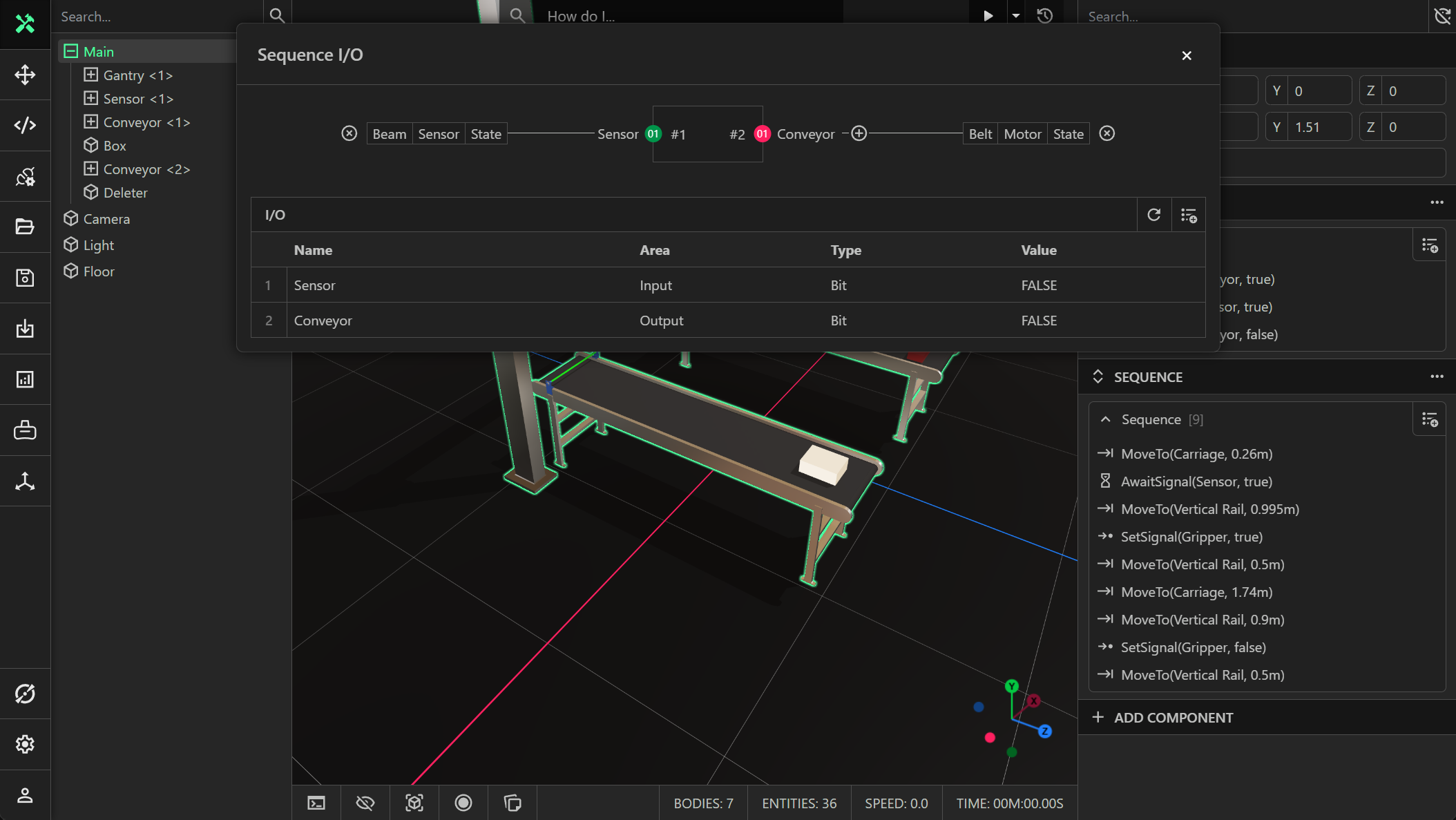
The sequence component has its own configurable IO, allowing users to add or remove IO points at design time. You can create a variable with a specified name, area (input/output), data type and value. You can then use direct connections to bind these signals to other signals, defined by a Entity/Component/Property path.
For example, in the screenshot below an input signal called Sensor and an output signal called Conveyor were created. A direct IO connection between the state of the sensor component attached to the beam entity and the Sensor signal was created. Furthermore, a direct connection between the state of the motor for the belt entity and the Conveyor signal was created. This ensures that when we call SetSignal(Conveyor, true), the state of the motor for the belt is set to true.